Case study
AI Tester Agent
An exposed API key let someone rewrite our student chapter's website, and I kept seeing new developers push secrets straight to GitHub without knowing what to check. The AI Tester Agent checks for them: give it a URL and a repo, and a pipeline of agents tests the site like a user, scans it like an attacker, and tells you whether the release should ship and what to fix first.
- Role
- Frontend, backend, integration, deployment
- Timeline
- Feb – Apr 2026
- Team
- 3 people
- Award
- Winner, ATOS SRiJAN 2026
- Winner, ATOS SRiJAN 2026 (3,000+ teams)
- Up to 35 pages tested per run
- 0% duplicate fetches, 87% faster crawls
- APPROVED or BLOCKED, with reasons
The problem
Two things happened. First, an API key was exposed on our student chapter's website; someone found it and changed the site's content. Second, I kept seeing the same pattern with vibe coders: they do not know what to check or how to check it, so they push straight to GitHub. Often there is no .env file at all and secrets sit in ordinary source files, or the .env itself gets committed.
Neither problem is exotic. Both are caught by checks that nobody runs because nobody told them to. That became the brief: a tester that knows what to look for, runs it for you, and explains the result in plain words.
From v1 to v2
v1 was a 3-agent pipeline of lightweight JavaScript that took a few details from the user and ran them as test cases. It proved the idea but only checked what you already knew to ask for.
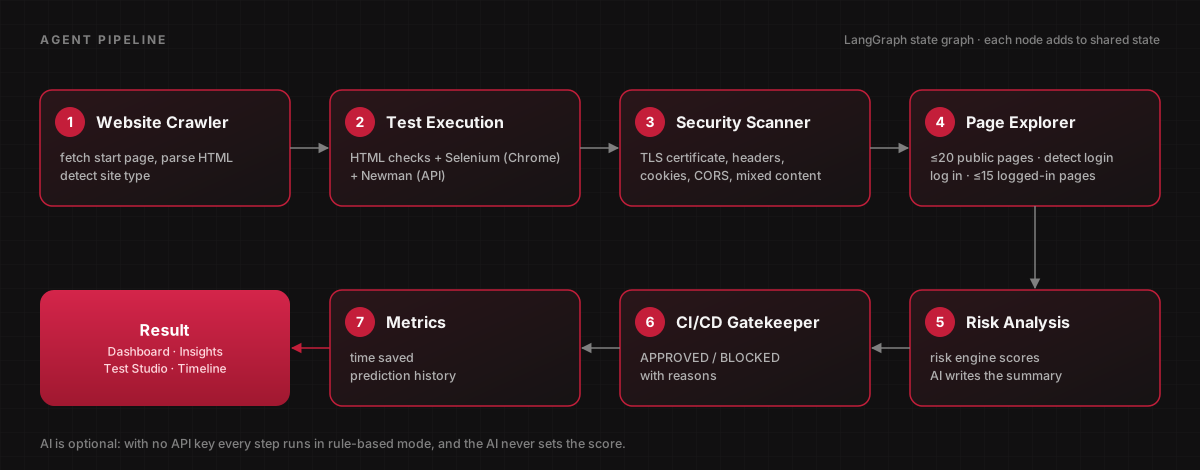
v2 grew the pipeline to seven agents, rebuilt it around real test runners, and made it proactive: instead of only reporting failures, it tells you which file caused them and how to fix it.
- Real browser tests with Selenium in headless Chrome, API tests with Newman, and a built-in security scanner for TLS, security headers, cookies, CORS, mixed content and open redirects.
- Multi-page crawl of up to 20 public pages, plus login detection and up to 15 pages tested behind a test account.
- A deterministic release risk score and a deployment gate that returns APPROVED or BLOCKED with reasons, and also runs in GitHub Actions.
- Code Intelligence: downloads the GitHub repo, maps failing tests to source files, and suggests line-level fixes for critical issues.
- Ask AI: a ChatGPT-style Q&A over your codebase that answers with file references.
- Run-to-run comparison: shows whether risk went up or down since the last run, and exactly which checks changed.
The agent pipeline
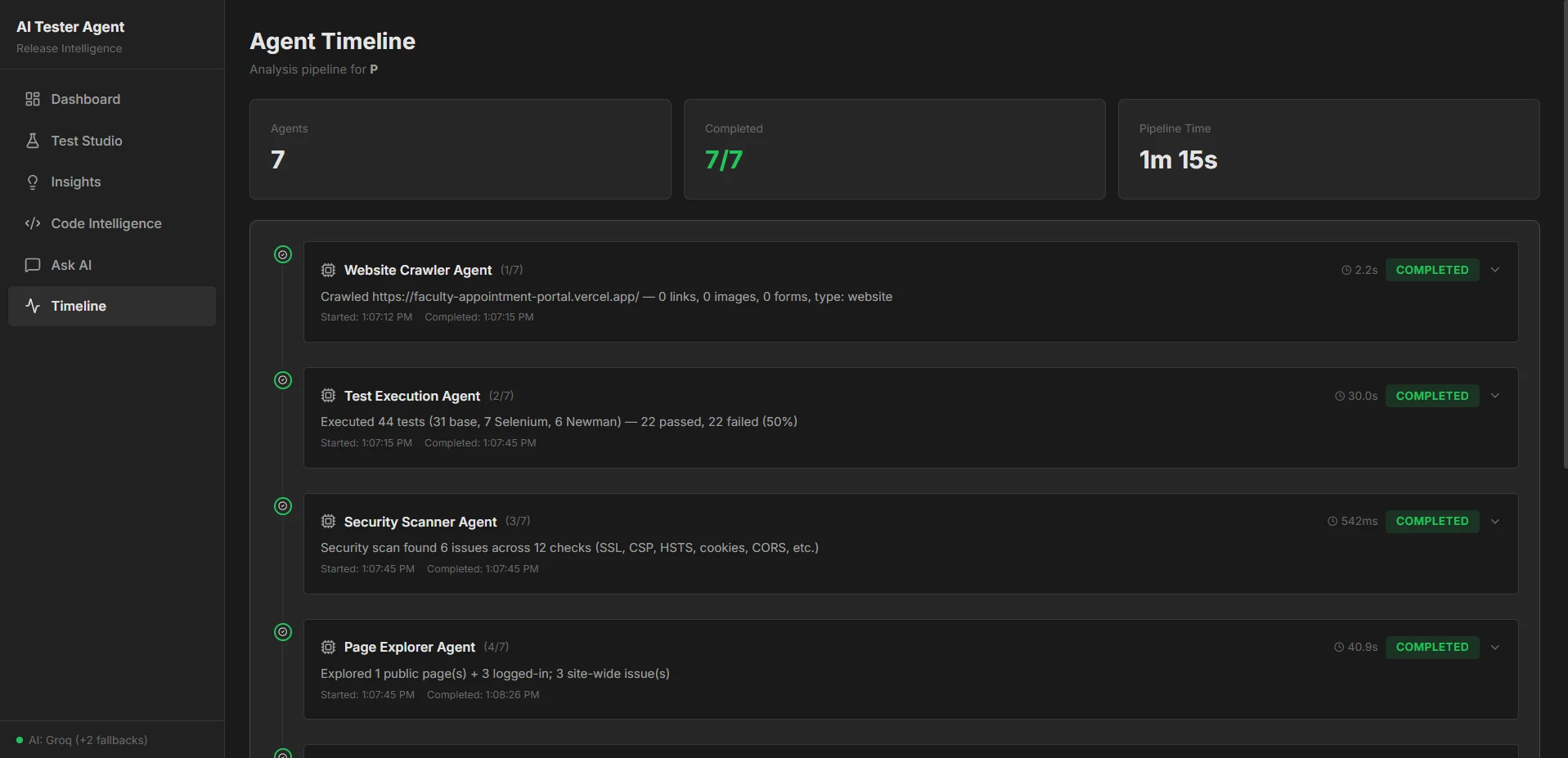
Every run is a LangGraph state graph. Each agent reads the shared state and adds its results, and the Timeline page shows every step, how long it took and what it found.
Pointed at my own project
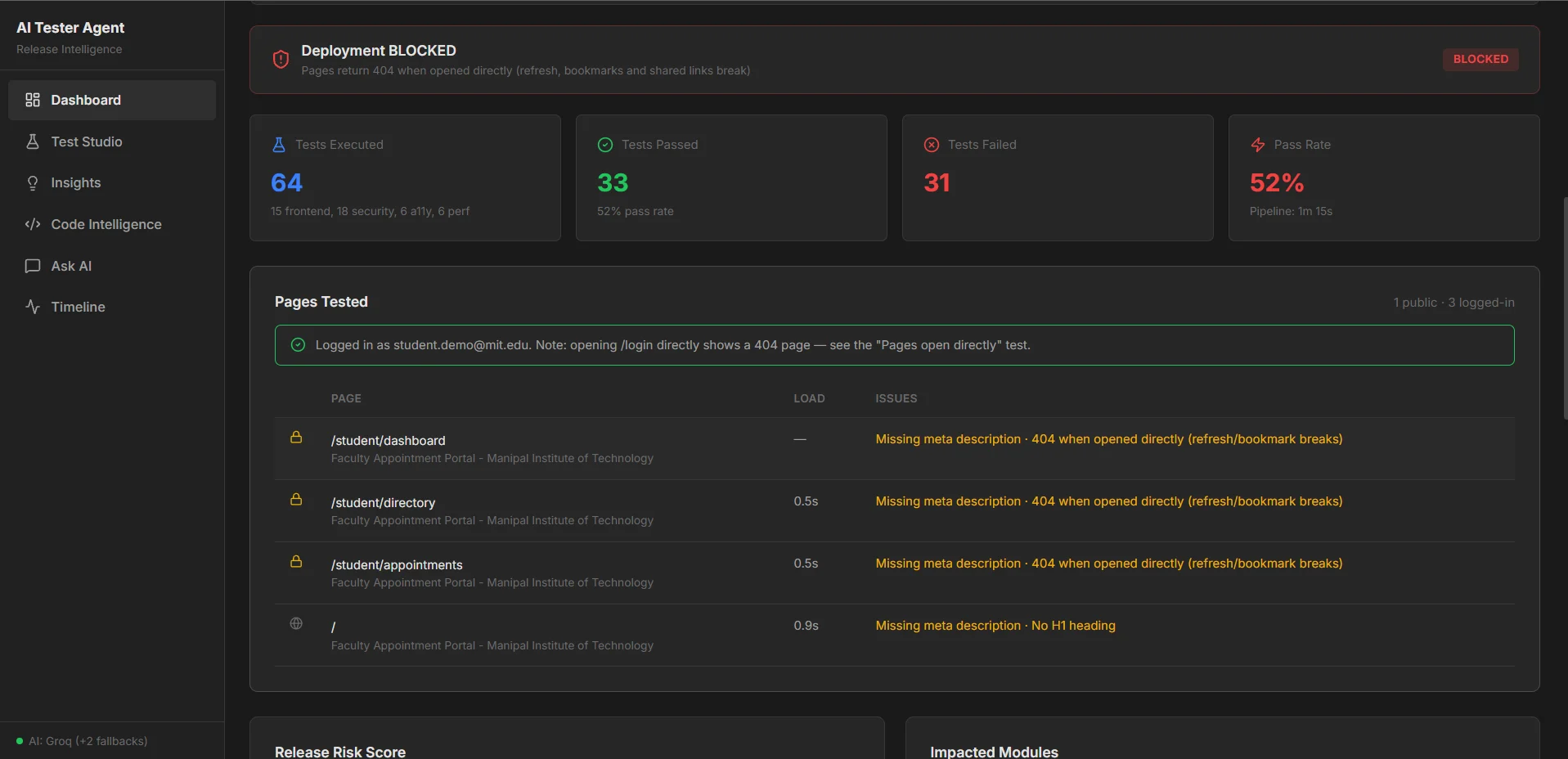
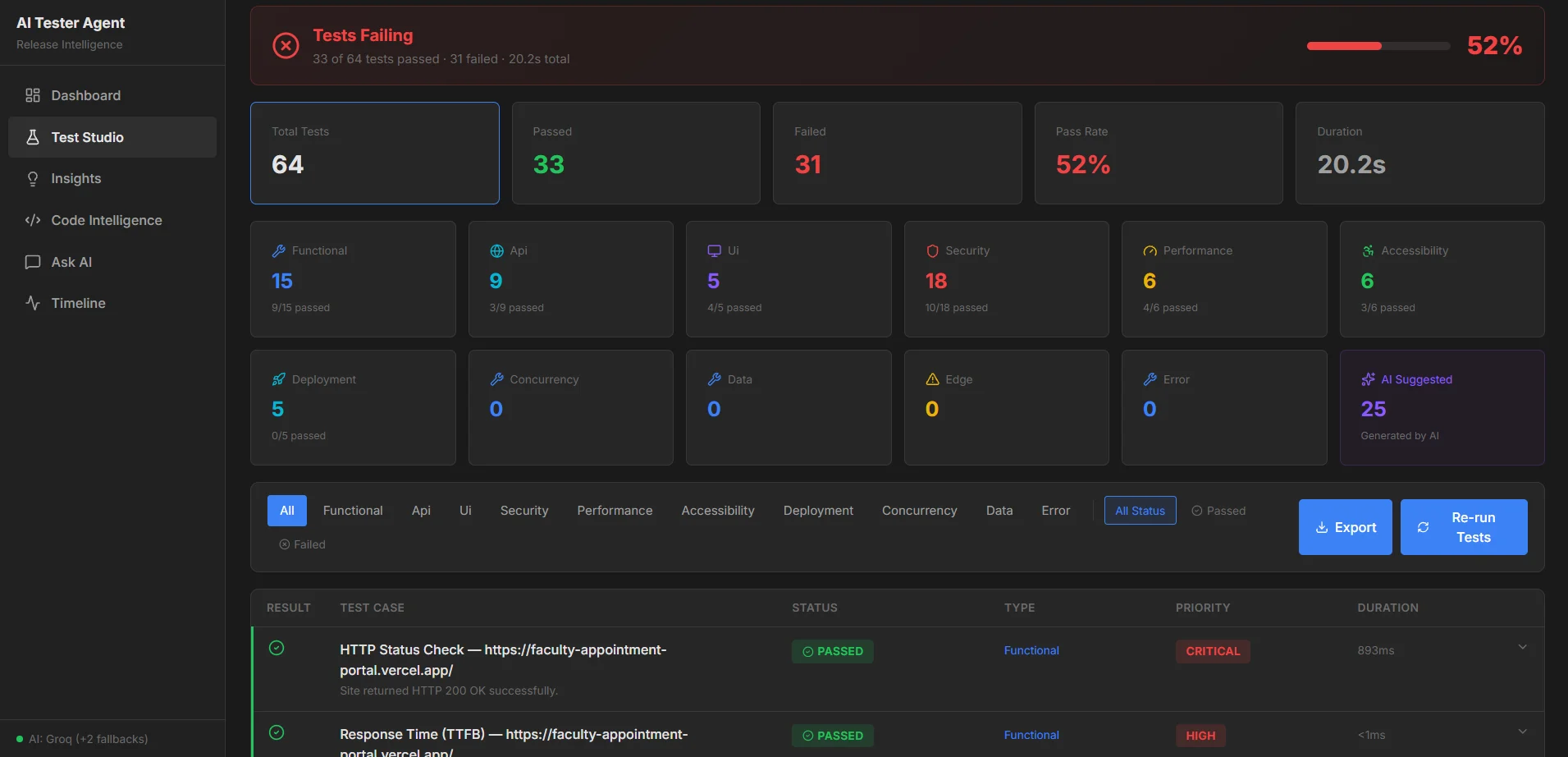
The first real target was my own Faculty Appointment Portal, tested with a student test account. The agent logged in, tested three pages behind the login and one public page, ran 64 tests across functional, API, UI, security, performance, accessibility and deployment checks, and blocked the release.
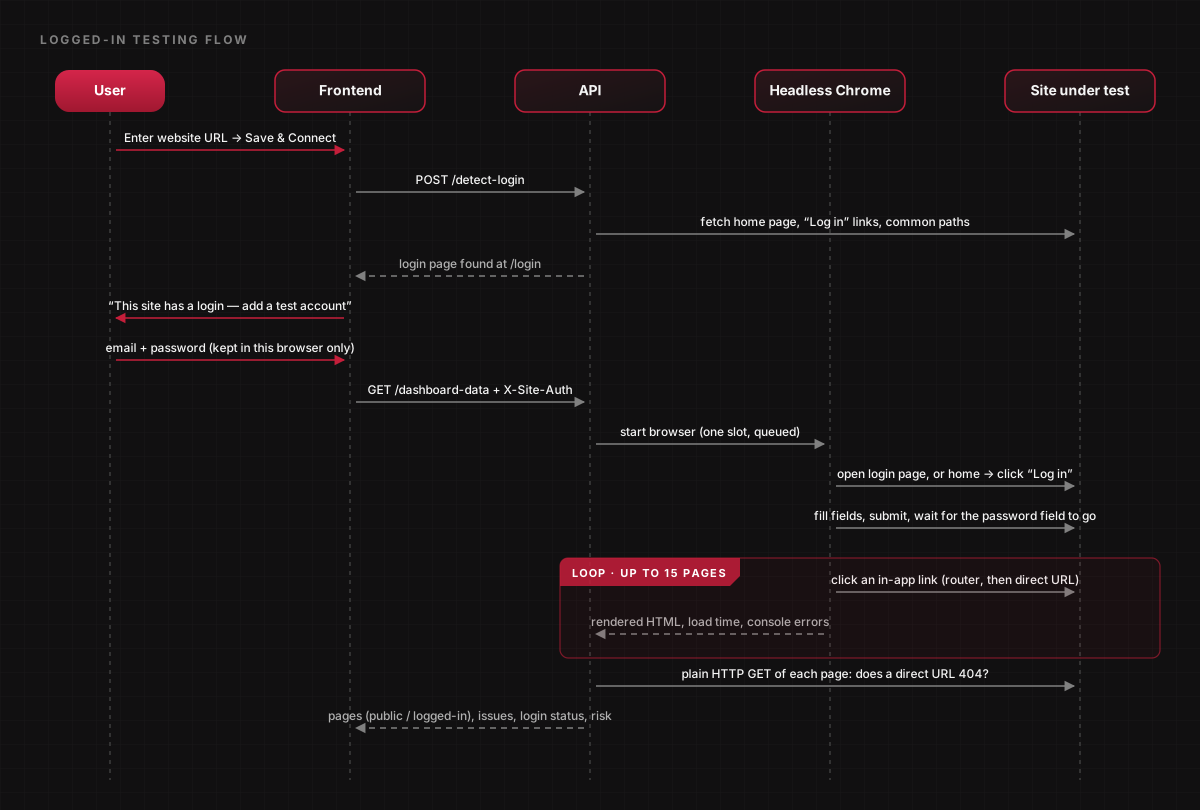
The blocker: pages behind the login returned 404 when opened directly, so a refresh, a bookmark or a shared link broke. Clicking through the app never shows it, which is exactly the kind of check nobody runs until a tool runs it for them.
Benchmarking the crawler
The crawler walks the site breadth-first, keeps a visited set so no page is fetched twice, and fetches pages in batches of four at a time. To check that this paid off, I compared it against a naive crawler (a plain queue with no visited set, fetching one page at a time) on quotes.toscrape.com, a public site built for crawler practice. Each figure is the median of 3 runs with a budget of 100 pages.
The result: duplicate fetches dropped from 53% to 0%, and crawl time fell by 87%.
- Duplicate fetches out of the same 100-fetch budget: 53 (53%) for the naive crawler, 0 for mine.
- Unique pages tested with those 100 fetches: 47 against 100, 2.1× as many.
- Time to reach 100 unique pages: 116.8 s (the naive crawler needed 395 fetches) against 15.1 s, 87% faster.
- Peak simultaneous requests: 1 against 4, as designed, so the speed-up never floods the target site.
Architecture
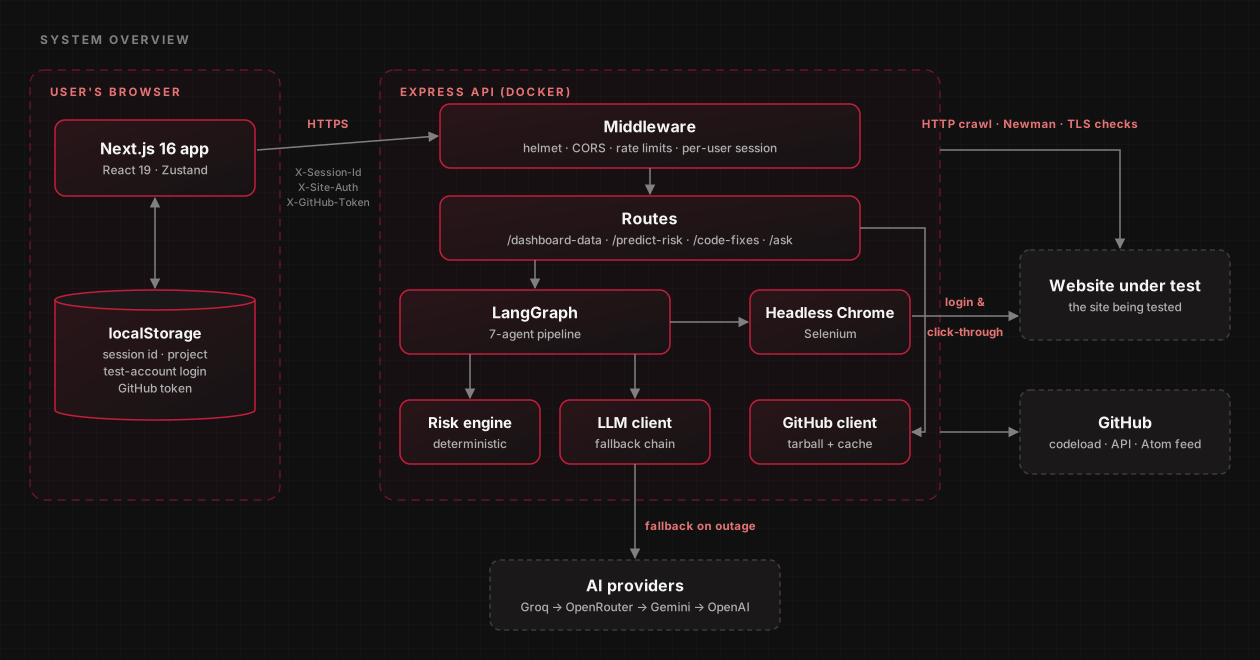
A Next.js 16 frontend talks to an Express API running in Docker with Chromium baked in. The API runs the pipeline, drives headless Chrome, pulls repositories from GitHub as a single cached tarball, and calls an LLM through a provider fallback chain. Test-account logins and GitHub tokens never leave the user's browser except as per-request headers.
Testing behind a login
Most real bugs live behind the login page, so the agent finds it, asks for a test account, and logs in with a real browser. It then clicks through the app like a user, which means single-page apps work too, and checks whether each page still loads when opened directly.
The password is request-scoped: it stays in the user's browser, is sent only with test runs, and is never stored, logged or sent to the AI. Once logged in the crawler only follows links; it never clicks buttons or submits forms, and skips anything that looks destructive, like logout or delete.
Decisions and trade-offs
The AI explains, it never scores. Risk comes from one deterministic formula weighted toward what actually breaks releases, so re-runs are stable and every page agrees on the number. Without an API key the whole tool still works in rule-based mode.
- Risk weights: Functionality 35, Security 30, Performance 15, Accessibility 10, SEO 10. Checks repeated by several runners count once.
- BLOCKED only for real release blockers (site down, broken pages, direct URLs that 404, HTTPS problems, mixed content, any critical functionality or security failure) or high risk: Functionality 50+, Security 60+ or overall 60+. Never for SEO alone.
- Every URL, including redirects and crawled links, is resolved and rejected if it points at a private network, so the server cannot be turned against internal systems.
- Per-session state keyed by a session header, IP rate limits, and one headless Chrome at a time with a queue, so a public demo stays safe and affordable.
- An LLM fallback chain across Groq, OpenRouter, Gemini and OpenAI with cooldowns, falling back to rule-based analysis if every provider is down.
What I would do next
Logged-in testing follows links, so screens reached only through buttons are not visited yet, and multi-step flows like booking an appointment are not executed. Logins behind CAPTCHA, 2FA or Sign in with Google cannot be automated, and the app says so. Sessions live in memory, so a server restart clears history. Executing real user flows is the next step.